Hyvä vs PWA: which frontend for Magento and Adobe Commerce?
For most Magento and Adobe Commerce stores Hyvä is the better choice: it keeps Magento’s server-rendered pages and modules, is quicker on the first page a shopper sees and costs less to build and run, while a PWA justifies its extra cost only where the store needs app behaviour.
Magento1Renders the page from its own layout and templates
Network2Sends nearly finished HTML and one Tailwind CSS file
Browser3Alpine.js wires up menus, filters and the basket
Page usableafter 3 steps
Extensions
Frontend reused, with a compatibility module where needed
Later pages
Each is a fresh, light page from Magento
PWA StudioA React app in the browser
Network1Downloads the application bundle (React, Venia UI, Peregrine)
Browser2Starts the app and works out which page the URL means
Magento3Answers the app’s GraphQL queries for products and prices
Browser4Renders the page; a service worker caches for next time
Page usableafter 4 steps
Extensions
Every storefront feature rebuilt in React
Later pages
Only data is fetched, so moves feel quick
How each frontend builds the first page a shopper lands on. Drawn by Refined Commerce from Hyvä’s and Adobe’s documentation, 31st October 2026.
Luma, the storefront Magento 2 ships with, is slow and expensive to change, and there are two serious ways to replace it. Hyvä keeps Magento in charge of the page and strips the frontend back. A progressive web app built with Adobe’s PWA Studio moves the storefront into a separate application that runs in the shopper’s browser. We build on Hyvä as a Hyvä Silver Partner; our conclusion is at the end, after the comparison.
What is the difference between Hyvä and a PWA?
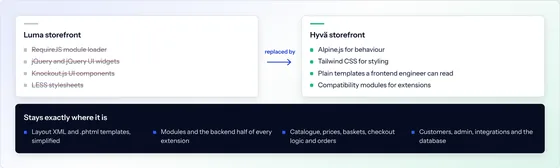
The difference is where the page is built. With Hyvä, Magento builds each page on the server from its own layout files and templates, as it always has, and sends the browser nearly finished HTML. Hyvä’s change is to what travels with that HTML: Luma’s stack of RequireJS, jQuery UI widgets, Knockout.js and LESS goes, replaced by two small tools, Alpine.js for behaviour and Tailwind CSS for styling. With a PWA, Magento stops building pages at all. The storefront becomes a React application, in PWA Studio’s case built from its Venia UI and Peregrine packages, which runs in the browser and asks Magento for products, prices and baskets through Magento’s GraphQL API. Magento becomes a backend; the shopper never loads a page Magento rendered.
Which is faster for shoppers?
Hyvä should be faster on the page that matters most, the first one. A shopper arriving from a search result or an advert lands on a single page, and on Hyvä that page arrives nearly complete: there is little for the browser to download and less for it to run before menus and buttons respond. A PWA has more to do on that first visit, because the browser must download the application, start it and fetch the data before it can draw anything useful. The figure above counts the steps. A PWA catches up afterwards: once the application is running, moving to the next page only needs data, so navigation can feel instant, and a service worker can cache what has been seen.
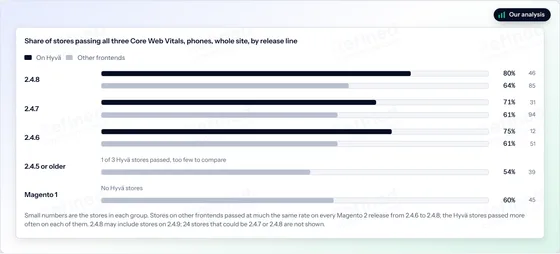
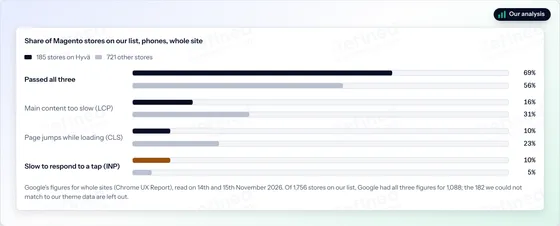
Google measures what shoppers experience through three Core Web Vitals, taken from real Chrome users: Largest Contentful Paint (good within 2.5 seconds), Interaction to Next Paint (good at 200 milliseconds or less) and Cumulative Layout Shift (good at 0.1 or less), each judged at the 75th percentile. Every visit begins with a first page, so first-load performance shapes all three. Our guide to Hyvä Themes sets out how Magento stores fare on them across the web and on three of the Hyvä stores in our case studies. In our own comparison of Google’s figures for UK Magento stores the Hyvä stores passed more often than the rest, but too few of the other stores in it ran a PWA frontend to compare on their own.
What happens to your Magento modules
On Hyvä most modules survive; on a PWA their storefront parts do not. A Magento module usually has two halves: backend logic, such as a payment method’s API calls or a delivery-date rule, and a storefront part written for Luma. Hyvä keeps Magento’s architecture, so the backend half works unchanged and the storefront half needs a compatibility module, many of which already exist, maintained by Hyvä’s community or by the module vendors. A PWA cannot use the storefront part of any Magento module at all, because there is no Magento-rendered page for it to attach to. Each feature has to be rebuilt in React and wired to a GraphQL endpoint, which the module may or may not provide. On one Hyvä store, for example, the payment provider’s Magento module runs on Hyvä Checkout through two further packages from the same vendor, one for Hyvä Checkout and one for the Hyvä theme; on a PWA that work would be a rebuild.
For a store that relies on a dozen or so modules, as many Magento and Adobe Commerce stores do, for payment, delivery, search, reviews and gift messages, this one difference can decide the question before speed is even discussed.
Build and running costs
Hyvä costs less to build and much less to keep, because there is only one application. A Hyvä build reuses everything Magento already does and replaces the presentation. A PWA build starts closer to a blank page: every page type, every interaction and every module’s storefront is written again. After launch the difference widens. A Hyvä store is upgraded with Magento, by the same engineers, in the same deployment. A PWA is a second application with its own dependencies, its own release cycle and its own failure modes, and it needs engineers who know React and GraphQL as well as Magento for as long as the store trades. The same reasoning applies to content: on one Hyvä store we moved the content pages out of a separate headless CMS into Hyvä CMS in autumn 2026, so they can be edited in the Magento Admin and there is one system fewer to keep running.
Licensing no longer separates them. The Hyvä Theme became free and open source, distributed under the OSL and AFL licences; Hyvä’s paid products, such as Hyvä Checkout and Hyvä Enterprise, are optional. PWA Studio’s packages are published under the same pair of licences.
Which is better for SEO?
Hyvä, because it is ordinary server-rendered HTML. Search engines receive the same finished page a shopper does, with titles, product data and links in the markup, so everything a merchant already knows about search applies unchanged. A PWA renders in the browser, so the work of making sure search engines see the same content as customers, through server-side rendering or prerendering, has to be designed in, built and kept working through every release. It can be done well, but it is one more part of the store to test after every release.
What changed in 2025 and 2026
None of the changes of the past two years alters the answer for a typical store. The Hyvä Theme became free and open source, which removed the licence from the cost of a move; our guide to Hyvä Themes sets out what is free and what is paid. Hyvä also set a support floor: its documentation now lists Magento 2.4.4-p9, 2.4.5-p8, 2.4.6-p7, 2.4.7-p1 or higher on PHP 8.1 to 8.4, and says that from 2027 its products will be built for PHP 8.2 and newer, which ends support for 2.4.4 and 2.4.5. And Adobe built a second headless option, Adobe Commerce Storefront on Edge Delivery Services. Its documentation says the storefront’s drop-in components need an Adobe Commerce as a Cloud Service or Adobe Commerce Optimizer licence and that Magento Open Source is not supported.
PWA Studio itself is still published: version 11.7.4 of its Venia UI package reached the npm registry on 26th October 2026.
Hyvä and PWA Studio side by side
Question
Hyvä
PWA Studio
Who builds the page
Magento, on the server
A React app, in the browser
Storefront tools
Alpine.js and Tailwind CSS
React, Venia UI, Peregrine, GraphQL
First page a shopper lands on
Light, nearly finished HTML
App must load and start first
Moving between pages
A fresh page each time
Data only; can feel instant
Magento modules
Kept; storefront via compatibility module
Storefront rebuilt in React
Search engines
Server-rendered by default
Needs rendering designed in
Skills to run it
Magento engineers
Magento plus React and GraphQL
Applications to maintain
One
Two, upgraded separately
Licence
Theme free, OSL or AFL
Free, OSL or AFL
Compiled from Hyvä’s and Adobe’s documentation and the npm registry, checked 31st October 2026.
Which should you choose?
Choose Hyvä unless you can name the app behaviour you need and the team that will maintain it. Hyvä suits a store that needs to be faster soon, relies on Magento modules it wants to keep, works with a Magento team rather than a React team, depends on search traffic and wants to keep build and running costs down. A PWA suits a store with a specific need for app behaviour, such as offline use or installation to the home screen, strong React and GraphQL capability in-house or on a long-term contract, the willingness to rebuild module features, and the budget for a longer project and a permanently larger maintenance footprint.
We think that for most Magento and Adobe Commerce stores, Hyvä delivers most of what a PWA promises, in a form the merchant’s existing team can maintain.
Sources
Dates, versions and bulletin numbers on this page were checked against each publisher’s own page on . Where a publisher changes its page after that date, its page is the authority.
The Hyvä Theme itself is free and open source, distributed under the OSL and AFL licences with a free access key from hyva.io. Hyvä’s other products, Hyvä UI, Hyvä Checkout, Hyvä Commerce and Hyvä Enterprise, are paid, and their prices are published on hyva.io. A migration still costs engineering time, which we estimate in writing once we have examined the store.
Which Magento versions does Hyvä support?
Hyvä’s documentation lists Magento 2.4.4-p9, 2.4.5-p8, 2.4.6-p7 and 2.4.7-p1 or higher, on PHP 8.1 to 8.4. It also says that from 2027 Hyvä products will be built for PHP 8.2 and newer, so stores on 2.4.4 or 2.4.5, which only run on PHP 8.1, will no longer be supported.
Is PWA Studio still maintained?
Yes. Adobe still publishes PWA Studio packages: @magento/venia-ui 11.7.4 appeared on the npm registry on 26th October 2026. Adobe has also built a newer headless storefront, Adobe Commerce Storefront on Edge Delivery Services, but its documentation says Magento Open Source is not supported and an Adobe licence is required.
We already have a PWA. Can we move to Hyvä?
Yes, but it is a rebuild of the frontend, because the two are built in different ways. Whether it is worth doing depends on how the PWA performs for real shoppers and what it costs to keep two applications current. Field data from Google’s Chrome UX Report and a look at the maintenance history usually settle it.
Does Hyvä work on Adobe Commerce?
Yes. Hyvä runs on Adobe Commerce as it does on Magento Open Source. Adobe Commerce features with a storefront part, such as B2B, content staging and loyalty, are covered by Hyvä Enterprise, a paid product that Hyvä describes as full Adobe Commerce support.
Still on Luma? Find out what your store shows the world, free.
Give us the address and we will read what the store already shows the world: release, support status, PHP, headers, hosting and any sign of a hijack. One page, by email, within two working days. Nothing is accessed or tested.
Magento Open Source, Adobe Commerce and Mage-OS stores
Read from public pages only, and free
Written up by an engineer who read the store
Free store health checkOne page, by email
What you receiveExample report
Magento Security and Upgrade Health Check
example-store.co.ukNeeds attention
Platform
Magento Open Source 2.4.4-p3
Adobe support
ended 12th April 2025
PHP
8.1, end of life
Frontend
Luma
Security headers
2 of 6 present
Hijack indicators
none found
What we would do first. Apply the outstanding security fixes, then plan the upgrade to a supported release.