Black Friday on Magento: the security and speed checks that still matter this week.
Black Friday is on 27th November 2026. If your Magento store is already in a change freeze, the useful work this week is checking: that the store has Adobe’s latest security fixes, that only the right people can reach the Admin and the checkout’s scripts, that the cache and the firewall can take the traffic without blocking customers, and that someone is watching from Friday to Cyber Monday.
Fri 27thBlack FridayOne named person on call, with the alerts going to them
Sat 28th and Sun 29thWatchUptime, payments, orders reaching the ERP, errors and disk
Mon 30thCyber MondayThe same watch as the weekend
From Tue 1st DecCatch upReindexes, imports and module updates, then the work held back until January
Until Cyber Monday is over, only this goes liveSecurity fixes and fixes for things that are broken, each tested on staging first. Nothing else.
Black Friday to Cyber Monday 2026, day by day. Plan by Refined Commerce, 25th November 2026.
Black Friday is on Friday 27th November 2026 and Cyber Monday on the 30th. On one Magento store whose figures we checked, Black Friday week in 2025 brought about one and a half times the orders of an ordinary week earlier that November. If you have frozen your code by now, I think that’s right. What’s left is checking the store and deciding who acts on what the checks find.
Is the store on Adobe’s latest security fixes?
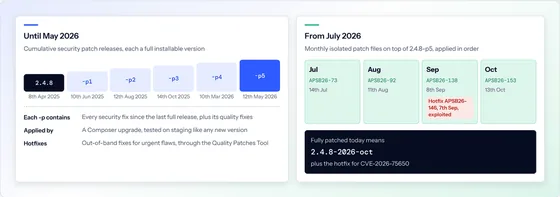
Security fixes and fixes for broken things are the only changes a freeze should still let through, and the security fixes come first. When I checked Adobe’s list of security bulletins on 25th November 2026, the most recent for Adobe Commerce was APSB26-153 of 13th October, a Priority 2 update. There had been none in November. Priority 2 updates are due within 30 days. A store it applies to that doesn’t have it has been overdue since 12th November. Check the patch history on the server as well as the store’s release.
The September hotfix for CVE-2026-75650 is separate and matters more. Adobe rated it Priority 1, said the flaw was being exploited, and its instructions for the fix include rotating the store’s encryption keys after applying it. If it was applied without the key rotation, finish that first. If there is any sign the store was compromised before the fix went on, treat it as an incident rather than a patch.
If either fix is missing, I’d test it on staging today and deploy it before Friday. If the store is on a release Adobe no longer patches, the fixes have to be backported, so ask whoever maintains the code now. Then agree who would handle a Priority 1 bulletin if one arrived over the weekend, because those are due as soon as possible. How Magento security patches work explains the priorities and the different kinds of patch.
Close the Admin to anyone who doesn’t need it
Adobe’s security guidance recommends two-factor authentication for the Admin, and Magento 2.4 requires it of every Admin user unless the store signs in through Adobe IMS, where Adobe’s own sign-in enforces it. Check that nobody has disabled it, then go down the list of Admin users for people who have left, old agencies and shared logins. Adobe also advises a non-default Admin address and, where you can, an allow list of the networks that may reach it.
If you add an allow list this week, add your agency’s and your developers’ addresses in the same change, check that each one belongs to someone who should have access, and have the person on call sign in afterwards. Otherwise the people you’d call on Saturday can’t get in.
Know what runs on your checkout
The most common attack Adobe reports injects code into the absolute header or footer of the storefront, where it can read what shoppers type. On the checkout, that includes card details. In the Admin, under Content, Design, Configuration, open each store view and read the scripts in the HTML head and footer fields. Then open the checkout in a browser and look at what actually loads there, including anything added through a tag manager or a module. You should recognise every one.
From 2.4.7, Magento enforces its Content Security Policy by default on payment pages, in the storefront and the Admin, so the browser refuses scripts the policy does not allow. Earlier releases only report them by default. Reading the settings by eye only finds what is there today. In November 2026, most of the Magento stores we look after had their code scanned for malware at least once a day. If nothing scans yours, a scanner is worth adding once the freeze lifts. This week, our free health check looks for injected scripts from outside.
Protect the requests the cache can’t answer
Magento treats pages as cacheable by default, so product and category pages are usually served from the full page cache at little cost to the server. Requests made for one shopper are different. Adding to the basket, signing in and placing an order have to be handled by Magento itself every time. A surge of those requests, whether from shoppers or from bots, is what puts the server under strain, because each one costs it real work.
Before Friday, check that the full page cache is enabled and that product and category pages are being served from it. Check that cron is running: Magento needs it for indexing, and for order emails when they are sent asynchronously, so a stopped cron can show up as stale prices and stock or as customers who never get their confirmation. And look for anything scheduled for the weekend, such as a full reindex, a cache flush or a large product import. Unless a stock or price feed depends on it, move it to Tuesday.
Firewall rules that block the wrong visitors
Rate limits on sign-in and add-to-basket requests are a sensible defence, set at the firewall so that Magento never sees the excess. The risk at peak is a rule that catches your own systems. Payment providers call back to the store, stock and order integrations connect every few minutes, and uptime checks need to get through. When we set up Cloudflare health checks on stores at one managed Magento host in September 2026, the host’s limit on bots answered Cloudflare’s default checker with 429 errors, so our checks now send their own user agent. We also keep integration addresses on the firewall’s allow list, as our Business Central integration guide describes. Keep those exceptions to the addresses and paths each caller needs, and check any new rule against them before Friday.
Cloudflare’s Under Attack mode puts an interstitial page in front of visitors, and Cloudflare describes it as one of the last resorts during an attack. It needs JavaScript, can affect your analytics, and can stop payment callbacks and other automated requests from getting through. I’d keep it for a real attack, and enable it for the paths being attacked with a configuration rule rather than for the whole site.
Who is watching from Friday to Monday?
Name one person for each day, a second to call if they don’t answer, and agree how quickly they will act. Between them, they need to see:
whether the home page, a category page and a product page are up, checked from outside every minute or so;
a test run through the basket to the payment step, every few hours;
failed payments by method, against an ordinary day;
orders reaching the warehouse or ERP, and stock levels coming back;
the error log and the server’s free disk space;
the malware scanner’s report, if there is one.
Write down how to put the store into maintenance mode, how to roll back the last deployment and how to check that the store is taking orders again afterwards, somewhere the person on call can find it at 21:00 on a Friday.
What can wait until January
Anything that needs new code. Speed work, a new payment method and a move from Luma to Hyvä belong after the peak, planned against what this weekend shows. While it happens, keep a note of slow pages, errors and the checkout steps where people gave up. That list is where we’d start in January.
Sources
Dates, versions and bulletin numbers on this page were checked against each publisher’s own page on . Where a publisher changes its page after that date, its page is the authority.
Security fixes and fixes for things that are broken, each tested on staging first. Adobe asks for Priority 1 security updates as soon as possible, so one published over the weekend should not sit until Tuesday. Routine work such as reindexes, imports and module updates can wait until Tuesday 1st December, and new code until January.
Should we enable Cloudflare’s Under Attack mode for Black Friday?
Not as a precaution. Cloudflare describes it as one of the last resorts when a site is under attack. Visitors see an interstitial page that needs JavaScript, it can affect your analytics, and it can stop payment callbacks and other automated requests from reaching the store. If you need it, enable it with a configuration rule for the paths being attacked rather than for the whole site.
Can you tell from outside whether a Magento store is patched?
Partly. The release a store runs, and so whether Adobe still ships fixes for it, can often be read from what the store serves. Whether every monthly isolated patch and hotfix has been applied usually cannot, so our free health check reports what it can see and says plainly what it cannot. The patch history on the server is the only reliable record.
What is the latest Magento security update?
As at 25th November 2026, APSB26-153, published on 13th October 2026 as a Priority 2 update. The September 2026 hotfix for CVE-2026-75650 is not included in it and has to be applied separately, followed by rotating the encryption keys as Adobe’s instructions set out.
Give us the address and we will read what the store already shows the world: release, support status, PHP, headers, hosting and any sign of a hijack. One page, by email, within two working days. Nothing is accessed or tested.
Magento Open Source, Adobe Commerce and Mage-OS stores
Read from public pages only, and free
Written up by an engineer who read the store
Free store health checkOne page, by email
What you receiveExample report
Magento Security and Upgrade Health Check
example-store.co.ukNeeds attention
Platform
Magento Open Source 2.4.4-p3
Adobe support
ended 12th April 2025
PHP
8.1, end of life
Frontend
Luma
Security headers
2 of 6 present
Hijack indicators
none found
What we would do first. Apply the outstanding security fixes, then plan the upgrade to a supported release.