Magento security audit checklist for Magento Open Source and Adobe Commerce.
A Magento security audit should confirm the store is on a supported, fully patched release and then work outward and inward from there, checking the Admin, extensions and custom code, what the storefront serves, the server and edge, and whether you could recover, using the 36 checks below.
07Monitoring and recoveryScans, notifications, backups, config export, incident plan5 checks
Outside: what any visitor or attacker can reachInside: what only your team should touch
The seven layers of the checklist and the number of checks in each. Drawn by Refined Commerce, 31st October 2026.
Most Magento security checklists are lists of settings. That is part of it, but an audit that ticks every setting and misses an unapplied hotfix, or a skimmer sitting in the footer, has failed. The checklist below follows the order we work in, starts with what attackers actually exploit, and ties each check to Adobe’s own guidance so you can see why it is there. It applies to Magento Open Source and Adobe Commerce alike unless a check says otherwise.
What should a Magento security audit cover?
Seven layers, starting with the one that is most often wrong: the release and its patches. Adobe’s own security guidance says most compromises are not the work of an innovative attacker but of attackers exploiting unpatched vulnerabilities, weak passwords and poor file ownership and permissions. So an audit begins with patch state, then the Admin, because a stolen Admin password is a stolen store, then extensions and custom code, then what the storefront is actually serving, then the server and the edge in front of it, and ends with whether you would notice an attack and could recover. The figure shows the layers and the number of checks in each; the sections below take them in order of risk.
Is the store on a supported, fully patched release?
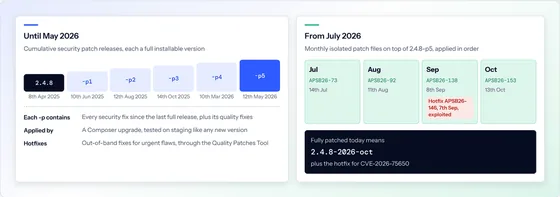
This is check number one, and since July 2026 it has more parts than a version number. Adobe now ships a monthly isolated security patch for each supported line, applied on top of the latest -p release, with each month building on the previous one. A store can therefore be on 2.4.8-p5, a supported line and the latest -p, and still be months behind. Hotfixes sit outside the chain: Adobe’s note on the October 2026 patch says the September hotfix for CVE-2026-75650, an exploited flaw scored 10.0, is not included and must be applied separately. Magento security patches explained covers the patch types in detail.
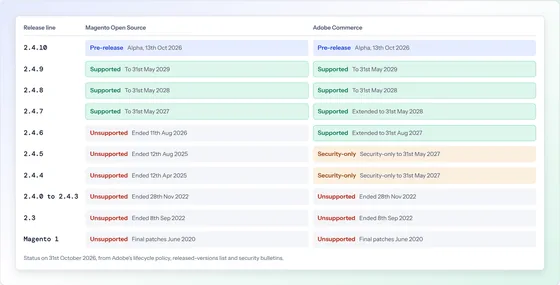
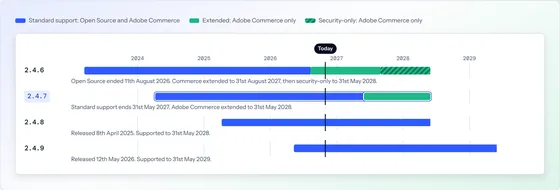
The release line is inside its support window for your edition (Magento Open Source lines stop at standard support).
The store is on the latest -p release for its line, for example 2.4.7-p10 or 2.4.8-p5.
Every monthly isolated patch since July 2026 is applied, in release order.
Every published hotfix is applied, confirmed with the Quality Patches Tool status command.
Sensitive configuration values are locked to the environment with the lock-env option, so they cannot be changed from the Admin.
On 2.4.7 and later, Content Security Policy is still in restrict mode on payment pages, as Adobe ships it.
Is the Admin locked down?
The Admin is where an attacker turns a password into your store, so Adobe lists securing it among its highest-priority recommendations. Adobe advises a non-default Admin URL rather than “admin” or “backend”, two-factor authentication for every Admin user and every SSH connection, reCAPTCHA against automated password guessing, and the principle of least privilege when assigning roles. Its advanced security settings add a secret key to Admin URLs, limit session length and lock accounts after failed sign-ins. Adobe’s two-factor documentation says the Admin requires it unless the store signs in through Adobe IMS.
The Admin lives at a non-default path, ideally reachable only from known IP addresses or a VPN.
Two-factor authentication is required for every Admin user.
reCAPTCHA protects the Admin sign-in form.
Every Admin user is a named, current person with the narrowest role that does the job; leavers are removed.
Admin URL secret keys, session lifetime and account lockout are set in the advanced security settings.
Integration and API tokens are listed, owned and revoked when no longer used.
Are extensions and custom code safe?
Every extension is code from another company running with full access to your store, so where it came from matters. Adobe’s guidance is to source extensions only from the Adobe Commerce Marketplace or through your integrator, to make sure the licence can transfer if the integrator changes, to limit the number of extensions and vendors, to keep them updated alongside the core, and to review extension and custom code for PHP features that can lead to remote code execution or weak cryptography. An audit lists every module, its source and its version against the vendor’s current release.
Every extension came from the Marketplace or a known vendor, and its licence is in your name.
Unused and duplicate extensions are removed, not just disabled.
Every extension is on a current, supported version.
Custom modules have been reviewed for unsafe input handling, remote code execution risks and weak cryptography.
Has anything been injected into the storefront?
This is where real compromises are found, and most checklists skip it. Adobe says that in the most commonly experienced attacks, malicious code is injected into the absolute header or footer of a store and collects what customers type, including sign-in details and checkout forms, sending it elsewhere; in other cases malware replaces the payment form with a fake one. None of that changes the version number. An audit reads the head and footer scripts configured in the Admin, the CMS blocks and pages, and the scripts that actually load on checkout, and checks the store is not serving spam pages to search engines.
Scripts in the Admin’s HTML head and footer settings are all known and wanted.
CMS blocks and pages contain no unexpected scripts or iframes.
Every third-party script on checkout pages is listed, owned and allowed by the Content Security Policy.
The payment form is the payment provider’s own, loaded from the provider’s domain.
A search for your domain shows no spam pages you did not publish.
Are the server and the edge configured safely?
Magento is only as safe as the software underneath it and the network in front of it. Adobe’s lifecycle policy says it does not fix third-party dependencies, PHP, MariaDB, OpenSearch, Redis, Valkey, RabbitMQ and others, that reach end of life during a Commerce release’s support, and that keeping them supported is the merchant’s responsibility. PHP 8.1 reached end of life on 31st December 2025 and PHP 8.2 reaches it on 31st December 2026; Is Magento Open Source still supported? pairs each Magento line with its PHP versions. Adobe also recommends a web application firewall, HTTPS across the whole site, protection against clickjacking and a review for development leftovers.
The whole site is served over HTTPS.
A web application firewall sits in front of the store.
Response headers include clickjacking protection and the store’s Content Security Policy.
The Admin and SSH are reachable only from known addresses, through a VPN or an access list.
Security headers are checked from outside, not assumed from configuration.
PHP is a version still receiving security fixes.
The database, search engine, cache and message queue are on supported versions.
SSH uses keys or two-factor authentication, never shared passwords.
File ownership and permissions follow Adobe’s guidance, with nothing world-writable that should not be.
No .git directories, log files, database dumps or phpinfo files are reachable from the web.
Could you spot an attack and recover from one?
An audit that only looks for problems today misses the question of tomorrow. Adobe recommends its Security Scan Tool, free from your Commerce account for both editions, which it says runs over 21,000 security tests on a weekly, daily or on-demand schedule; its security notification service, so bulletins reach a person on the day; and a disaster recovery plan, including exporting the store’s configuration so the application can be redeployed. A backup that has never been restored is a hope, not a plan.
Adobe’s Security Scan Tool is set up and scheduled, and someone reads the reports.
Someone responsible is subscribed to Adobe’s security notifications.
Code, media and database are backed up off the server, and a restore has been tested.
Configuration is exported so the store can be redeployed quickly.
There is a written incident plan: who decides, who is called, how the store is taken offline safely.
Which checks matter most?
If you only have an afternoon, do these ten, in this order. They cover the ways stores are actually compromised and each can be checked quickly by someone with access.
Rank
Check
How to check
Why it ranks here
1
Hotfixes applied
Quality Patches Tool status
Hotfixes are for flaws already exploited
2
Every monthly patch applied
Patch status against each month’s list
Each month builds on the last
3
Supported line, latest -p
composer.lock against Adobe’s versions list
Monthly patches need it
4
Head and footer scripts
Admin content settings, then the live page
Adobe’s most common attack
5
Admin two-factor for everyone
Admin user list and 2FA settings
Stops stolen passwords working
6
Admin users and roles
Admin user list
Old accounts are open doors
7
PHP in support
Server PHP version against php.net
Adobe flags PCI risk
8
Checkout scripts and CSP
Browser developer tools on checkout
Where card data is typed
9
No web-reachable leftovers
Request /.git/ and common dump names
Leaks credentials and code
10
A restore has been tested
Restore to staging
Recovery is the last defence
Ranked by Refined Commerce; each check follows Adobe’s security guidance and release documentation, checked 31st October 2026.
No checklist makes a store secure on its own, and no honest audit promises that it will. What it does is replace “we think we are fine” with a written list of what is fine, what is not, and what to fix first.
Sources
Every date, version and bulletin number in this article was checked against the publisher’s own page on . Where a page changes after that date, the publisher’s page is the authority.
Once properly, then lightly every month. Adobe now publishes Adobe Commerce security bulletins monthly, so patch state needs checking monthly; the Admin, extensions and content checks are worth a full pass at least once a year and after any change of agency, developer or hosting.
Is Adobe’s Security Scan Tool enough?
It is a good start and it is free from your Commerce account for both Magento Open Source and Adobe Commerce. Adobe says it runs over 21,000 security tests on a schedule you set. It looks at the store from outside, so it cannot tell you who has Admin access, how extensions were sourced or whether backups restore.
Does Magento enforce two-factor authentication?
For the Admin, yes, unless the store signs in through Adobe IMS. Adobe’s documentation says every Admin user must set up the required two-factor methods the first time they sign in and authenticate with one each time after. It applies to the Admin only, not to customer accounts.
What does Content Security Policy do on a Magento checkout?
From 2.4.7, Adobe sets CSP to restrict mode on payment pages in the storefront and Admin, and report-only everywhere else. On payment pages the browser refuses scripts that are not on the allow list, and inline scripts need a nonce, which makes injected card skimmers much harder to run.
Can an audit be done without access to the server?
Part of one. Release, PHP, headers, hosting and signs of a hijack can be read from the publicly served pages, which is what our free health check does. Admin users, extension sources, file permissions, patches applied and backups need access and an agreed scope.
Give us the address and we will read what the store already shows the world: release, support status, PHP, headers, hosting and any sign of a hijack. One page, by email, within two working days. Nothing is accessed or tested.
Magento Open Source, Adobe Commerce and Mage-OS stores
No login, no access, no obligation
Written by a person, not a scanner
Free store health checkOne page, by email
What you receive
Example reportMagento Security and Upgrade Health Check
example-store.co.ukNeeds attention
Platform
Magento Open Source 2.4.4-p3
Adobe support
ended 12th April 2025
PHP
8.1, end of life 31st Dec 2025
Frontend
Luma
Security headers
2 of 6 present
Hijack indicators
none found
What we would do first. Apply the outstanding security fixes, then plan the upgrade to a supported release.