Magento security patches explained: APSB bulletins, -p releases and how often to patch.
Since July 2026 Adobe has published a security bulletin for Magento Open Source and Adobe Commerce in most months, so a store needs a monthly patching routine that applies each Priority 2 update within Adobe’s 30 days and any Priority 1 hotfix within days, on top of the latest -p release for its line.
Fully patched today means2.4.8-2026-octplus the hotfix for CVE-2026-75650
One release line, 2.4.8, from general availability to today. Dates from Adobe’s released-versions page and security bulletins, checked 31st October 2026.
“Is the store patched?” sounds like a yes-or-no question. For Magento it is not, because Adobe ships fixes in several forms, on more than one schedule, and the rules changed in July 2026. This article explains what a bulletin tells you, how the patch types fit together, what changed this year and how quickly a merchant should act. Every date and number below comes from Adobe’s own pages.
What is an APSB bulletin?
An APSB is an Adobe Security Bulletin, and it is the authoritative notice that a Magento security fix exists. Each bulletin has an identifier such as APSB26-153: the year, then a running number shared across all Adobe products. For Magento Open Source and Adobe Commerce it lists the affected versions, the fixed versions, each vulnerability’s CVE number and category, its CVSS severity score, whether you have to be logged in to exploit it, a priority rating for the whole update and, importantly, whether Adobe is aware of attacks in the wild. Bulletins used to live on Adobe’s HelpX site; Adobe moved them to its Trust Center, keeping those published through 22nd September 2026 on HelpX as an archive.
Read the summary line first. “Adobe is not aware of any exploits in the wild” and “Adobe is aware of CVE-2026-75650 being exploited in the wild” call for very different responses.
How quickly should you apply a Magento security patch?
As fast as Adobe’s priority rating says, which for most bulletins means within 30 days. Adobe gives every update one of three priority ratings. Priority 1: act as soon as possible, because the vulnerabilities are being actively exploited or are at higher risk of exploitation. Priority 2: act within 30 days, because exploitation is likely given the nature of the flaw and the product’s history, though no exploits are known. Priority 3: act at your administrator’s discretion. Separately, each vulnerability carries a CVSS score; from October 2026 Adobe labels them Critical (9.0 to 10.0), High (7.0 to 8.9), Medium (4.0 to 6.9) and Low (0.1 to 3.9). The priority tells you how fast to move; the severity tells you how bad it would be.
What are -p releases, isolated patches and hotfixes?
They are the different containers Adobe uses to ship fixes, and a store usually needs more than one of them. Adobe’s release policy defines them. A security patch release adds “-p” and a number to a version, such as 2.4.7-p10: it is a full installable version containing the security fixes and some quality fixes since the last patch release. An isolated security patch file is a standalone patch containing only security fixes, released quickly and folded into the next security patch release. A hotfix contains high-impact fixes, such as for a zero-day, and is delivered through Adobe’s Quality Patches Tool. Individual patches carry low-impact quality fixes. A custom patch is anything written by someone other than Adobe.
Type
Example
What it contains
How it arrives
Security patch release
2.4.8-p5
Security fixes plus prior quality fixes; a complete version
Composer upgrade
Isolated security patch
2-4-8-p5-oct-2026
Security fixes only, for one month
Patch file from the bulletin’s notes
Hotfix
CVE-2026-75650
An urgent fix, possibly backward-incompatible
Quality Patches Tool or patch file
Individual patch
Quality fix
One low-impact quality fix
Quality Patches Tool
Full patch release
2.4.9
Features, quality and security fixes; once a year, in May
Upgrade project
Definitions from Adobe’s release policy and patch release schedule, checked 31st October 2026.
What changed in July 2026?
Adobe moved from occasional -p releases to a monthly isolated patch on top of the latest one. On 12th May 2026 Adobe released 2.4.9 alongside 2.4.8-p5, 2.4.7-p10, 2.4.6-p15, 2.4.5-p17 and 2.4.4-p18. No further -p versions have followed. Instead, the bulletins of 14th July, 11th August, 8th September and 13th October each came with an isolated patch for every supported line, and the bulletins began naming the fixed state by month: 2.4.8-2026-jul, then -aug, -sep and -oct. Adobe’s October notes add the rule that matters: each monthly isolated patch builds on the one before, so every previous month must already be applied, in release order, and you must be on the latest -p version for your line before you start.
The practical effect is that patch state is now a chain. A store that skipped August cannot simply apply October.
How often does Adobe publish Magento security fixes?
Monthly from July to October 2026, on a predictable day. Adobe published six Adobe Commerce bulletins in 2025 and seven so far in 2026. Every scheduled 2026 bulletin landed on the second Tuesday of its month; the only exception was APSB26-146, a Priority 1 hotfix published on Monday 7th September for a vulnerability already being exploited. The pattern did not hold in November: as at 13th November 2026, Adobe’s bulletin list shows no Commerce bulletin for Tuesday 10th November, so the most recent remains APSB26-153 of 13th October. Adobe’s patch schedule commits only to security patches at least once a year, so the monthly rhythm is a record, not a promise.
Exploited Magento flaws are not rare events. Adobe’s June 2024 bulletin, APSB24-40, noted that CVE-2024-34102, an XML external entity flaw scored 9.8, had been exploited in limited attacks; in October 2025 Adobe amended APSB25-88 to say CVE-2025-54236 was being exploited in the wild.
Which patches can a Magento Open Source store get?
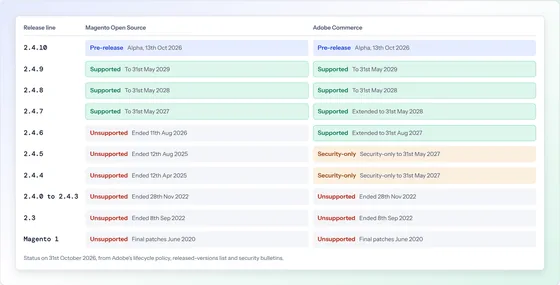
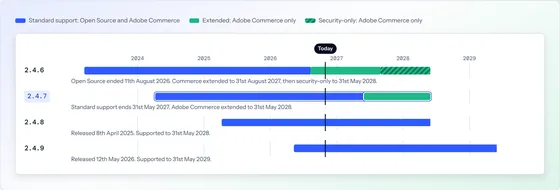
Only those for release lines still in standard support, which today means 2.4.7, 2.4.8 and 2.4.9. Adobe’s release policy says plainly that extended support security patches are available to Adobe Commerce customers only and not for the Magento Open Source code base. The bulletins show the effect. In September and October 2026 the fixed versions listed for Adobe Commerce run from 2.4.4 to 2.4.9, while those for Magento Open Source stop at 2.4.7, because 2.4.6’s standard support ended on 11th August 2026. Adobe’s October patch notes confirm that Open Source merchants can download that month’s isolated patches only for 2.4.7 or later.
An Open Source store on 2.4.6 or older therefore receives nothing from Adobe. Fixes can still be backported by hand from a supported line, which is skilled work that gets harder every month; it is a bridge to an upgrade, not a substitute for one. The dates for every line are in Is Magento Open Source still supported?
What does a good patching routine look like?
A fixed monthly cycle, with an emergency lane beside it. The cycle starts on bulletin day and ends with proof that the patch is live. It looks like this:
Read the bulletin on the day. Note the priority, whether anything is exploited and which fixes need no login.
Confirm your starting point. Check the installed version and that every earlier monthly patch is applied, because each month builds on the last.
Apply on staging first. Install the patch on a copy of the store with your real extensions and theme.
Test what earns money. Search, basket, checkout with every payment method, account sign-in and any integration that moves orders.
Deploy at a quiet time, with a way back. Then confirm with the Quality Patches Tool that every patch reports as applied.
Record it. Version, patches and date, so the next month starts from a known state.
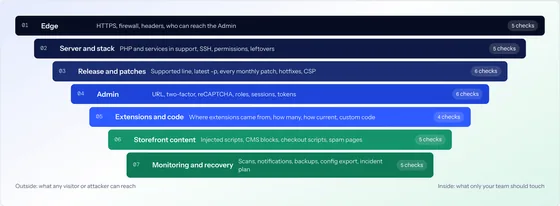
The emergency lane is the same steps compressed into hours rather than days, used whenever a bulletin is Priority 1. Patching is one layer of seven; our Magento security audit checklist covers the rest.
Sources
Every date, version and bulletin number in this article was checked against the publisher’s own page on . Where a page changes after that date, the publisher’s page is the authority.
Where are Adobe Commerce security bulletins published now?
On the Adobe Trust Center. Adobe’s HelpX page for Adobe Commerce says bulletins have moved there and that those published through 22nd September 2026 remain on HelpX as an archive. Adobe also runs a security notification service you can subscribe to by email.
Can a Magento Open Source store get the same patches as Adobe Commerce?
Only while its release line is in standard support. Adobe’s release policy says extended support security patches are available to Adobe Commerce customers only. The October 2026 patch notes say Open Source merchants can download that month’s isolated patches only for 2.4.7 or later.
Do we have to install the -p releases if we apply the monthly patches?
Yes. Adobe says an isolated security patch file can only be applied on the latest security-only patch release for your line, for example 2.4.7-p10 or 2.4.8-p5, because that is the only version the isolated fixes are tested against. A store on 2.4.7-p6 has to reach 2.4.7-p10 first.
Is a hotfix enough on its own?
No. Adobe’s lifecycle policy says a hotfix is not comprehensive and does not address all the security issues that upgrading to the latest release would. The September 2026 hotfix for CVE-2026-75650 is also, by Adobe’s own note, not included in the October isolated patch and has to be applied separately.
How do we check which patches are installed?
Adobe’s instructions use the Quality Patches Tool: running vendor/bin/magento-patches status lists each patch with its status. The installed version itself is in composer.lock. Adobe also offers a free Security Scan Tool in your Commerce account that runs scheduled checks against the live store.
Why does Adobe’s own documentation still say quarterly?
Adobe’s security best-practice page, last updated 8th October 2026, says Commerce typically releases security updates quarterly. The bulletin record says otherwise: since July 2026 there has been an Adobe Commerce bulletin every month. Plan for monthly, which is what has actually happened.
Not sure which patch level your store is on? Find out, free.
Give us the address and we will read what the store already shows the world: release, support status, PHP, headers, hosting and any sign of a hijack. One page, by email, within two working days. Nothing is accessed or tested.
Magento Open Source, Adobe Commerce and Mage-OS stores
No login, no access, no obligation
Written by a person, not a scanner
Free store health checkOne page, by email
What you receive
Example reportMagento Security and Upgrade Health Check
example-store.co.ukNeeds attention
Platform
Magento Open Source 2.4.4-p3
Adobe support
ended 12th April 2025
PHP
8.1, end of life 31st Dec 2025
Frontend
Luma
Security headers
2 of 6 present
Hijack indicators
none found
What we would do first. Apply the outstanding security fixes, then plan the upgrade to a supported release.