Magento to Shopify migration: what you lose, what you gain and how it works.
Moving from Magento or Adobe Commerce to Shopify trades control for less to run: Shopify hosts, patches and upgrades the platform so the support calendar disappears, but you work within its fixed URL paths, three product options and checkout rules, and the move itself is a data, URL and integration project rather than a switch.
Products, attributes, configurable productsRemodelledProducts, up to 3 options and 2,048 variants each, plus metafields
Categories and layered navigationRemodelledCollections and filters
CMS pages and blocksRebuiltPages and theme sections
Customers and addressesMoves acrossCustomers, imported after products
Order historyMoves acrossHistorical orders, imported last
Every URL Google knowsRemodelledNew fixed paths plus URL redirects
Extensions and custom modulesRebuiltApps, or rebuilt as custom app code
Checkout customisationsRebuiltCheckout UI extensions (some steps Plus only)
Where each part of a Magento store lands on Shopify, and how much work it takes. Drawn by Refined Commerce from Shopify’s documentation, 31st October 2026.
Merchants usually start asking about Shopify at the same moment: a Magento support date is coming, the upgrade quote has arrived, and the question becomes whether to keep paying to run a platform at all. Sometimes the answer is to move. Sometimes it is to stay and upgrade. We do both, so this article tries to describe the trade honestly rather than sell either side.
What do you gain by moving from Magento to Shopify?
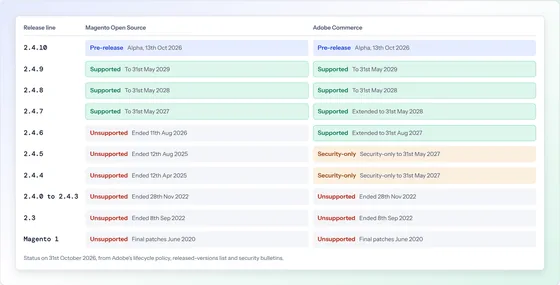
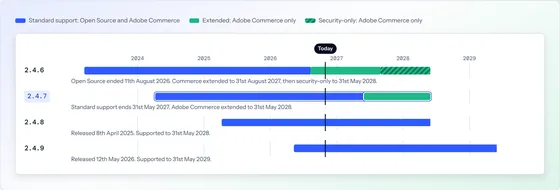
You stop running a platform. On Magento Open Source or Adobe Commerce, the merchant, or their agency, owns hosting, PHP and database versions, security patching and upgrades to a new release line roughly every few years, because Adobe supports each line for three years from release, as our guide to Magento 2.4.7’s end of support sets out. On Shopify, Shopify runs all of that. There are no release lines to track, no monthly security patches to apply and no PHP end-of-life dates. Many merchants also find the admin easier for day-to-day staff and the App Store quicker for common jobs, and for merchants on Microsoft Dynamics 365 Business Central, Microsoft ships a Shopify Connector inside Business Central, preinstalled for new sign-ups; the Magento equivalent is covered in Magento and Business Central integration.
For a store whose catalogue and processes fit Shopify’s model, that combination can lower both the running cost and the number of things that can go wrong.
What do you give up?
You give up control over structure, and some of it you cannot buy back. Shopify’s URLs follow fixed paths for products and collections, which cannot themselves be redirected, so every product and category URL on a Magento store changes. Shopify allows a maximum of three options per product and up to 2,048 variants, so a Magento product configured on four or more attributes has to be remodelled. Checkout customisation now runs through checkout UI extensions; Shopify says extensions for the information, shipping and payment steps are available only on Shopify Plus, and its older checkout.liquid customisation is no longer supported for those steps. Extensions do not migrate: each one becomes an app, custom app code, or a feature you decide to drop.
Area
Magento or Adobe Commerce
Shopify
Hosting, patching, upgrades
Yours, or your agency’s
Shopify’s
Release support dates
Three years per line, then upgrade
None to track
URL structure
Configurable
Fixed paths for products and collections
Product options
Configured per attribute set
Maximum of three per product
Redirects
Server or URL rewrites
Up to 100,000, or 20 million on Plus
Checkout changes
Full code access
Checkout UI extensions; some steps Plus only
Payment providers
Any with an extension
Over 100; third-party fee unless Shopify Payments
Extensions
Modules in your codebase
Do not migrate; apps or rebuilt
Business Central
Extension, middleware or a build
Microsoft’s Shopify Connector
Shopify limits from Shopify’s help centre and developer documentation; Magento support terms from Adobe’s lifecycle policy, checked 31st October 2026.
Which stores should move, and which should stay?
Move if Magento has become more platform than the business uses; stay if the business depends on what only Magento allows. Stores that suit Shopify tend to have straightforward catalogues, standard checkout flows, a modest number of extensions doing common jobs, and owners who would rather spend on marketing than on platform maintenance. Stores that are better off upgrading Magento tend to have complex configurable products, customer-specific or tiered B2B pricing built into the checkout, multiple store views with different catalogues, deep custom integrations, or a frontend they have invested in heavily. Many stores sit in between, which is why the decision should come after an audit of the current store rather than before it.
How do products, customers and orders move?
In a fixed order, and mostly by app, CSV or API rather than a one-click importer. Shopify’s migration guide does not include Magento among its platform-specific guides; it points instead to CSV imports, migration apps, the Shopify APIs or a Shopify Partner. It also sets the order: products first, then customers, then historical orders, so that orders link to the right products and customers. Two details catch people out. Imported historical orders trigger a new-order email to every staff member set to receive them, so notifications should be switched off during the import. And Magento attributes that do not map to Shopify’s three options become metafields, which the theme then has to display.
Customer passwords are a smaller problem than they used to be: Shopify’s customer accounts can use passwordless sign-in with a one-time code sent by email, so no Magento password hash needs to move.
How do you protect your search traffic?
By redirecting every URL that has ever earned a visit, and testing the map before launch. Because product and collection paths change, the old Magento URLs will return errors unless each is redirected to its new home. Shopify’s rules shape the map: you can create up to 100,000 redirects, or 20 million on Shopify Plus; redirects only fire for URLs that would otherwise be broken; and you cannot redirect from Shopify’s own fixed paths. The source list should come from Magento’s URL rewrites, the sitemap, analytics landing pages and Search Console, not from the catalogue alone, because old campaign and category URLs often still carry links.
What should you decide before the migration starts?
The decisions that change the build, made in writing before anyone writes code. Most migration overruns come from questions answered halfway through. Settle these first:
Shopify or Shopify Plus. Plus changes what the checkout can do, raises the redirect limit from 100,000 to 20 million and gives access to features some larger stores rely on. Choose on what the store needs, not on what is nice to have.
Payments. Shopify Payments or your current provider. Third-party providers attract an extra Shopify transaction fee, so the choice affects running costs from the first order.
Every extension’s fate. For each Magento module: a built-in Shopify feature, an app, custom app code, or retirement. Apps carry their own subscriptions and their own scripts on the storefront.
Product structure. How products with more than three Magento attributes will be split or remodelled, and which attributes become metafields shown by the theme.
Customer communication. How existing account holders will be told to sign in on the new store, and when.
What to leave behind. Old products, dead categories and years of order history do not all have to move. A migration is the cheapest moment to tidy the catalogue.
How does a Magento to Shopify migration run?
As six stages, with the live Magento store trading until the last one.
Audit the Magento store. Catalogue structure, attributes, extensions, integrations, checkout customisations and the URLs that bring traffic.
Decide what each feature becomes. A Shopify feature, an app, custom app code or nothing, agreed in writing before anything is built.
Build the theme and integrations on a development store. Including payment, delivery, tax and any ERP connection.
Migrate data and rehearse. Products, then customers, then orders; repeat until counts and spot checks match.
Build and test the redirect map. Every source URL requested, every response checked.
Launch, then watch. Final data delta, DNS switch, test orders, and daily checks of errors, redirects and search coverage for the following weeks.
Sources
Every date, version and bulletin number in this article was checked against the publisher’s own page on . Where a page changes after that date, the publisher’s page is the authority.
Not as one of its own guides. Shopify’s migration documentation lists guides for Amazon, Clover, Etsy, eBay, GoDaddy, Lightspeed, Square, Squarespace, Wix and WooCommerce, and for other platforms points to CSV imports, migration apps from the Shopify App Store, the Shopify APIs or a Shopify Partner.
Will customers have to reset their passwords?
Not necessarily. Shopify’s customer accounts can use passwordless sign-in: when sign-in links are turned on, customers enter their email address and receive a one-time six-digit code, so no Magento password needs to move. How you tell customers about the change is worth planning.
Can we keep our payment provider?
Usually, because Shopify supports over 100 third-party card payment providers. Shopify charges a third-party transaction fee on payments through any provider other than Shopify Payments, with the rate depending on plan and location; Shopify’s pricing page gives the current figures.
Will we lose our search rankings?
Rankings depend on far more than the platform, and nobody can promise them either way. What a migration controls is whether Google can follow every old URL to its new home. A complete, tested redirect map, unchanged page content where it ranks well, and monitoring in the weeks after launch are what protect traffic.
We use Business Central. Does that change the decision?
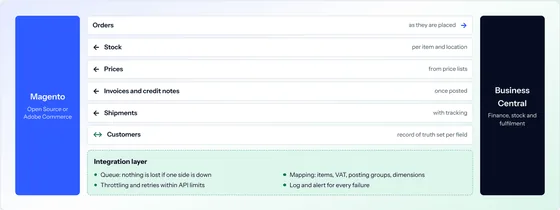
It can. Business Central includes a Shopify Connector from Microsoft, preinstalled for new sign-ups, which connects Shopify stores to Business Central. A Magento store needs an extension, middleware or a built integration for the same job, so for some merchants the integration story is simpler on Shopify.
Before deciding to move, see what your Magento store shows the world, free.
Give us the address and we will read what the store already shows the world: release, support status, PHP, headers, hosting and any sign of a hijack. One page, by email, within two working days. Nothing is accessed or tested.
Magento Open Source, Adobe Commerce and Mage-OS stores
No login, no access, no obligation
Written by a person, not a scanner
Free store health checkOne page, by email
What you receive
Example reportMagento Security and Upgrade Health Check
example-store.co.ukNeeds attention
Platform
Magento Open Source 2.4.4-p3
Adobe support
ended 12th April 2025
PHP
8.1, end of life 31st Dec 2025
Frontend
Luma
Security headers
2 of 6 present
Hijack indicators
none found
What we would do first. Apply the outstanding security fixes, then plan the upgrade to a supported release.